What to Buy After LEGO SPIKE Prime: 3 Options for Schools and Clubs
If your LEGO SPIKE Prime robots still work with your school’s devices, keep teaching with them. LEGO Education ended direct SPIKE sales on June 30, 2026, but says it will support the SPIKE App through June 30, 2031. You have time to find out which parts of your robotics program actually need replacing.
If you’re buying new equipment, choose based on what students should be able to do. VEX IQ is the first option I’d investigate for a class that builds and rebuilds mechanical robots. LEGO Education Computer Science & AI is worth a look if you want LEGO builds paired with a structured computer science curriculum. A micro:bit with a standard Cutebot is the budget choice for teaching loops, sensors, and autonomous driving on a mostly assembled chassis.
As an Amazon Associate I earn from qualifying purchases.
Compare the cost for 24 students
These are U.S. planning estimates using published vendor prices checked November 8, 2026. They exclude taxes, shipping, devices, and optional supplies. The group sizes matter: one robot shared by four students costs less per seat, but it also means fewer students have their hands on the robot at any moment.
| Option | What students build or program | Team size used here | One team | 24 students |
|---|---|---|---|---|
| VEX IQ Education Kit, 2nd generation | Build a chassis and mechanisms from parts; program motors and sensors | 2 | $499.99 | $5,999.88 for 12 single kits |
| LEGO Education Computer Science & AI, grades 6–8 | Build LEGO models and code them with wireless motors and a color sensor | 4 | $529.95 | $3,499 for the classroom bundle, including extra chargers, connection cards, and bricks |
| Standard ELECFREAKS Cutebot + micro:bit v2 Go bundle | Program a mostly assembled car to navigate using its onboard sensors | 2 | $49.85 plus 3 AAA batteries | $598.20 plus 36 AAA batteries |
The Cutebot price uses the listed sale price for model EF08209. Its micro:bit board is sold separately, and the batteries supplied with the Go bundle don’t cover the three batteries needed by the car. If you already own compatible micro:bit boards and data cables, leave those off the order. For VEX, compare the 12-kit estimate with the classroom bundle quotes; the bundles contain extras, and you may not need them for a classroom unit.
Keep, supplement, or switch?
Keep SPIKE if enough complete kits still run your lessons. Count working hubs, batteries, motors, sensors, and cables rather than counting boxes. On a student device, open a saved project, connect a hub, and run a motor. Save a copy of your lesson files in a school-managed folder; LEGO notes that projects in the web app aren’t automatically saved online. The retirement FAQ describes spare-parts stock for warranty obligations, so confirm availability before planning to repair multiple kits.
Supplement SPIKE if you’re short a few stations. Run a shared challenge such as “drive to a line and stop,” with SPIKE on some tables and micro:bit cars on others. Give everyone the same success criteria. Keep the platform-specific setup instructions on separate cards so students can work without waiting for you to translate blocks across tools.
Switch if several kits can no longer run the unit, your devices can’t reliably connect, or your next course needs capabilities the old equipment can’t provide. Buy or borrow one kit for a pilot before ordering for the whole class.
1. VEX IQ: for students who build the robot themselves
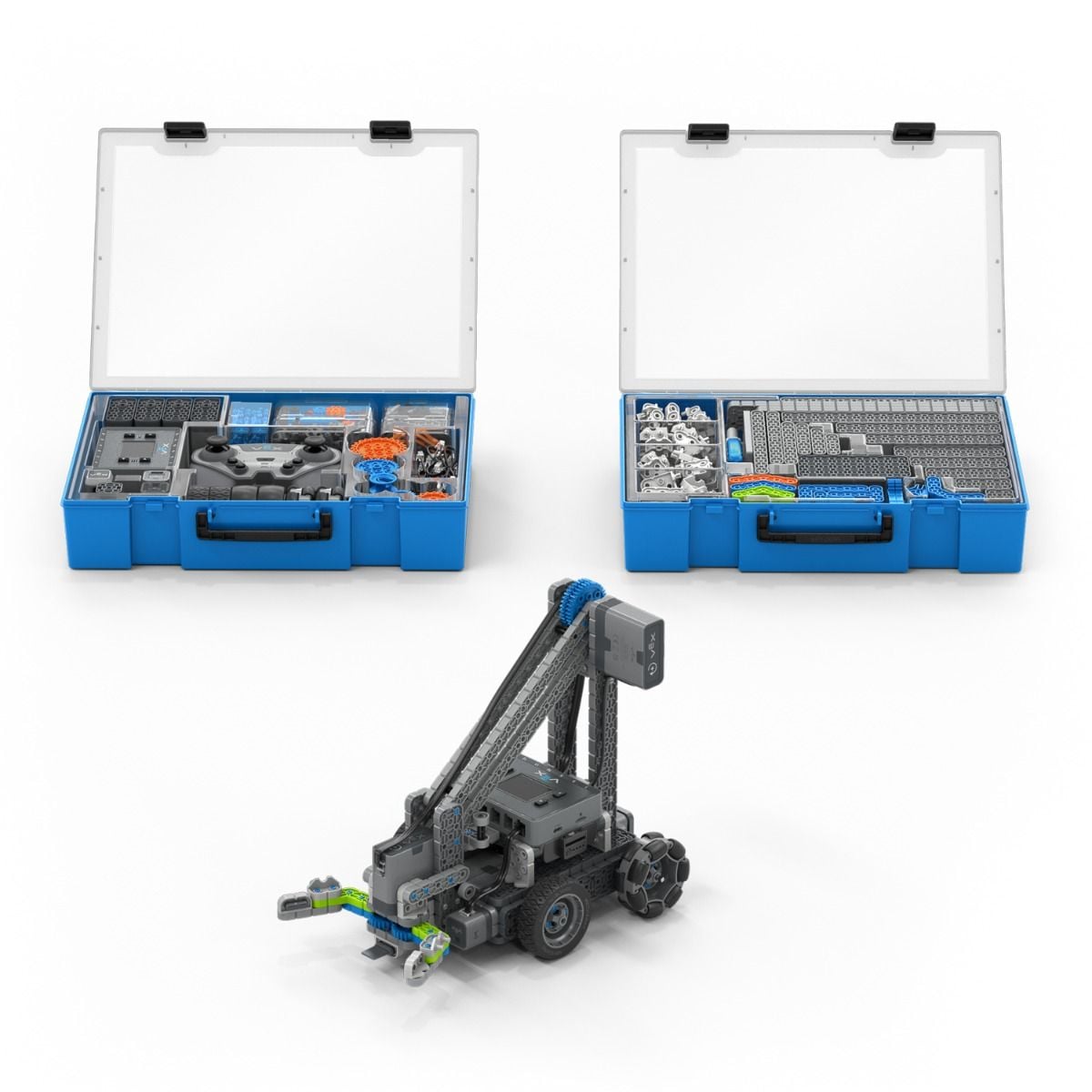
VEX IQ Education Kit, second generation, with an example build. Photo: VEX Robotics.
Choose VEX IQ if the learning goal is to change the machine and see what happens: move the axle, redesign the claw, or change how the drivetrain turns. The second-generation Education Kit includes four motors, a distance sensor, a bumper switch, and other parts for a build-and-redesign unit. It is a new ecosystem, so budget time to learn the parts and translate your favorite SPIKE lessons.
Chromebook check: VEX documents connecting the IQ Brain by USB in web-based VEXcode IQ. Use a managed student Chromebook for the pilot. Check the available ports and try downloading a program before committing to a class set.
Before you order: Ask the vendor to quote a spare motor, robot battery, and smart cables alongside the kits. If you run a competition team, confirm the event’s kit requirements before choosing between education and competition configurations.
2. LEGO Education Computer Science & AI: for LEGO builds and a guided CS curriculum

Grades 6–8 kit, model 45522. Photo: LEGO Education.
Choose this if you like building with LEGO and want prepared lessons that connect physical models to computer science. The grades 6–8 kit includes a double motor, single motor, color sensor, and controller. Look through two lessons you would actually teach and check that the parts support the builds you want. Budget for it as a separate system: check the parts and software requirements before assuming an existing SPIKE build or program will carry over.
Chromebook check: LEGO’s Coding Canvas FAQ lists compatible browsers and Bluetooth requirements, plus a camera for AI activities. Test device pairing and the specific lesson on a student account. For a camera activity, confirm your school permits it.
Before you order: If students will work in fours, assign roles: builder, programmer, tester, and recorder. Rotate after every test so each student gets a turn with the build and code.
3. micro:bit + Cutebot: for low-cost coding and sensor practice

Standard Cutebot, model EF08209. The micro:bit shown is sold separately. Photo: ELECFREAKS.

The separate micro:bit v2 Go bundle. The two included batteries are for the board’s battery holder; the Cutebot uses three AAA batteries. Photo: Adafruit.
Choose this if the goal is for students to write a program, test a sensor, or debug a robot’s behavior. The standard Cutebot already has a drivetrain and line sensors. That gets students to coding sooner, but it gives them less mechanical design work than VEX IQ. It’s a good option for adding stations or running a homeschool co-op with a modest budget.
Chromebook check: Open Microsoft MakeCode, add the Cutebot extension, and test WebUSB transfer with a student account. If pairing is blocked, check whether your school allows downloading and copying a program to the board as a USB drive. Verify that you have a data cable and that the robot runs on its own batteries after unplugging.
Before you order: Count one chassis, one board, one data cable, and three AAA batteries per station. Have spare batteries and a known-working cable at the teacher table. Confirm the model number; the standard Cutebot and Cutebot Pro have different hardware and power requirements.
Shopping links: Standard Cutebot chassis on Amazon (paid link) · micro:bit v2 Go bundle at Adafruit · 36 AAA batteries on Amazon (paid link). One 36-pack powers 12 cars for the first setup; budget extras if this is a regular station.
A 40-minute pilot lesson: deliver a supply to a marked zone
Use this same task with SPIKE and any platform you’re considering. Tape a start line and a finish zone on the floor. The robot must carry a folded paper “supply” and stop completely inside the zone without a student touching it.
- 5 minutes — Explain the goal. Ask students to predict how far the robot will travel at their chosen speed.
- 10 minutes — Write and run the first program. Begin with timed motor commands. Record whether the robot stopped short, inside, or past the zone.
- 15 minutes — Change one thing at a time. Adjust the speed or duration, then run three trials. If the kit has a suitable sensor, try a second version that stops when it detects a line or obstacle.
- 10 minutes — Compare and reset. Ask students which approach was more consistent. Have them save their code, disconnect the robot, and return the parts.
For this pilot, assemble the base robot beforehand so you can separate software and connection trouble from build time. If your course focuses on mechanical engineering, run a second pilot and give students a full class period to redesign the carrier or drivetrain.
What to record before placing an order
- Did the robot connect on a student device, and could students reopen their code?
- How many minutes passed before the first successful run?
- Did every student get a turn building or coding?
- Could the team recover from a bad cable, flat battery, or missing part without stopping the lesson?
- What is the delivered cost for the number of working stations you need, including spares?
Buying for a team? Check with your event organizer first. FIRST’s 2026–27 BIOGLOW information identifies SPIKE Prime for Founders Edition Challenge and LEGO Education Computer Science & AI for Future Edition. Availability varies by region. A good classroom kit may not qualify for the event you intend to enter.
Still using EV3? Try our LEGO Mindstorms Dancing Robot or browse the EV3 build instructions on the Downloads page. Carnegie Mellon Robotics Academy also lists curriculum support for SPIKE and EV3.